Last updated: November 16, 2026
Apple HomeView price in the US
| Model | Price | Colors | What's in the box |
|---|---|---|---|
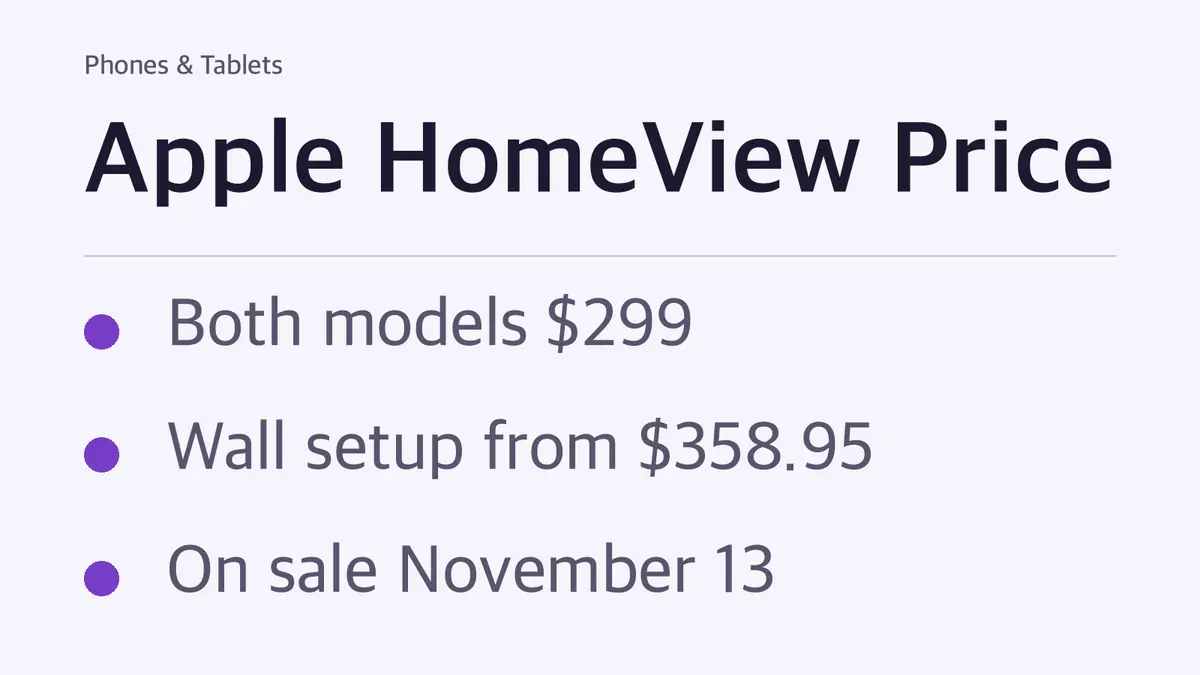
| Apple HomeView (tabletop) | $299 | Silver, Starlight, Rose Pink, Space Gray | HomeView, 1.5 m USB-C cable, 30W power adapter |
| Apple HomeView (Wall Mounted) | $299 | Silver, Space Gray | HomeView and documentation only |
There is only one configuration of each model. Color doesn't change the price, and there are no storage tiers to pick.
You can buy it at Apple Store locations, on apple.com/store and in the Apple Store app. Apple's prices are before sales tax.
What the wall-mounted HomeView really costs
Apple's spec sheet says the wall model needs a compatible wall mount, a USB-C cable and a power adapter of at least 20W, each sold separately. Apple sells three mounts made by Schneider Home:
| Mount | Mount price | HomeView + mount | When you can buy it |
|---|---|---|---|
| Power Mount USB-C Wall Connector | from $59.95 | from $358.95 | Now |
| Power Mount AC Wired | from $79.95 | from $378.95 | Now |
| Power Mount PoE Wired | $129.95 | $428.95 | Early 2027 |
The totals are simple sums of Apple's US prices. Add a USB-C cable and a 20W or larger adapter if you don't already have spares. The AC Wired mount draws power from inside the wall, so most people will want an electrician; Apple says the mounts can be self-installed or professionally installed.
That makes the tabletop model the cheaper way in by $59.95 or more, and it's the only one you can set up the day it arrives.
Tabletop vs. wall-mounted: what else is different
| Tabletop | Wall Mounted | |
|---|---|---|
| Speakers | Two full-range drivers, a down-firing woofer and two passive radiators | Two full-range drivers only |
| Size | 5.73 in wide, 5.38–6.82 in tall (tilts) | 5.73 × 5.73 in, 0.39 in deep |
| Weight | 2.1 lb (952 g) | 0.63 lb (286 g) |
| Colors | 4 | 2 |
| Power | Plug it in; adapter included | Mount, cable and adapter bought separately |
Everything else is shared: the 7-inch Liquid Retina display (1088 × 1088, up to 500 nits), the A18 chip, a 12MP Center Stage camera for FaceTime, four microphones for far-field Siri, Wi-Fi 6E, Bluetooth 6.0 and Thread.
The speaker gap matters most. If you want HomeView to double as a music speaker in the kitchen or living room, the tabletop model has the bass hardware. The wall model is aimed at entryways and hallways where you mostly glance at the screen and control the house.
Where Apple HomeView is sold
Since November 13, Apple sells HomeView in 7 countries: the US, UK, Canada, Australia, New Zealand, India and Singapore. In South Africa, it's sold through Apple Authorized Resellers.
It is not sold in the European Union. Apple says that's because Siri AI is not available in iOS in the EU, and it is working with the EU on a way forward.
Siri AI on HomeView works in English only for now. Canadian French is coming later in a free software update.
What you need to use it
- An iPhone on iOS 27.2 or later, or an iPad on iPadOS 27.2 or later, for setup and multiuser support.
- Wi-Fi internet access.
- An Apple Account for each person who wants their own Home Screen. HomeView recognizes up to 6 people by face.
You don't need the newest iPhone to get the basics. Apple says people without an Apple Intelligence-enabled iPhone or iPad still get Siri AI's world knowledge, natural conversation and music discovery. Personal answers that pull from your Calendar or Messages need a paired Apple Intelligence-enabled iPhone or iPad.
Personal content only appears when HomeView recognizes your face and your paired iPhone or iPad is nearby and was recently unlocked. Guests can still play music and see shared photo albums.
Siri AI on HomeView is labeled beta in HomeView software 27.2. Apple also notes that some server-based Apple Intelligence features have daily usage limits, with expanded access planned for a fee later.

What it does day to day
- Music and audio: Apple Music, Podcasts, Spatial Audio with Dolby Atmos, and AirPlay multiroom with HomePod and other speakers.
- Calls: FaceTime video and audio to any FaceTime-enabled device.
- Smart home: control lights, locks, thermostats and blinds that work with Apple Home or Matter, including the new Apple Home Collection cameras, thermostats and lock (sold separately). The Home Camera face can show up to 9 camera feeds at once.
- Safety: it listens for smoke and carbon monoxide alarm sounds and alerts your iPhone, iPad or Apple Watch.
- Personal info: each recognized person sees their own Messages, Calendar, Reminders and Find My.
Built-in apps: Alarms, Calendar, FaceTime, Find My, Home, Intercom, Messages, Music, Podcasts, Reminders, Safari, Settings, Timers, Weather and World Clock. Audiobooks, Classical, News, TV and supported third-party audio and video apps come over from your iPhone, and some of them need that iPhone nearby.
There's no App Store in Apple's app list. So don't buy HomeView expecting to install YouTube or Netflix the way you would on an iPad.
Which HomeView should you buy?
Get the tabletop model if:
- You want it to play music with real bass.
- You rent or don't want to drill or run power through a wall.
- You want the lowest total price: $299 with everything in the box.
Get the wall-mounted model if:
- You have a spot by the front door or in a hallway with power nearby.
- Counter space is the problem, not sound.
- You're fine paying $358.95 or more once the mount is included.
Skip it for now if: you live in the EU, you use Android, or your iPhone and iPad can't run iOS 27.2.
Sources
- Apple Newsroom: Apple HomeView available today (Nov. 13, 2026)
- Apple Newsroom: Meet Apple HomeView (Oct. 13, 2026)
- Apple: HomeView Technical Specifications
Prices are as of November 16, 2026 in US dollars, before sales tax.
Related guides
 iMac M6 Price: $1,499 to Start, $1,699 for 12-Core, Out Nov. 6Apple's new iMac with M6 comes in two models, $200 apart. The 12-core model adds two more Thunderbolt ports,…
 iPhone Battery Replacement Cost: $69 to $129 at Apple by ModelApple's out-of-warranty battery service costs $69 for older iPhones, $89 to $99 for most recent ones and $119 to…