Last updated: November 17, 2026
What a SIM PIN does
A SIM PIN is a short code tied to the SIM card or eSIM itself, not to your phone. Once it is turned on, your SIM locks every time the phone restarts or the card is pulled out. Until you type the PIN, the line can't be used for phone calls or cellular data, and an iPhone shows "Locked SIM" in the status bar.
The point is theft protection. Someone who takes your SIM can't drop it into another phone and start receiving your texts, including sign-in codes sent to your number. AT&T notes that the PIN follows the SIM card from one device to another.
Because the code belongs to the SIM, your phone maker can't reset it. Apple says plainly that the SIM PIN and PUK come from your carrier.
Default SIM PIN by carrier
| Carrier | Default SIM PIN | Where it's documented |
|---|---|---|
| AT&T | 1111 | AT&T "Lock SIM card with PIN code" |
| Verizon | 1111 | Verizon SIM PIN guides for iPhone, Galaxy S25, Pixel Fold, moto g 5G |
| Ting | 0000 or 1234 | Ting "SIM PINs and PUK codes" |
| T-Mobile, Mint, Metro and other carriers | Printed on the card the SIM came in | Your SIM packaging or carrier account |
Two practical rules:
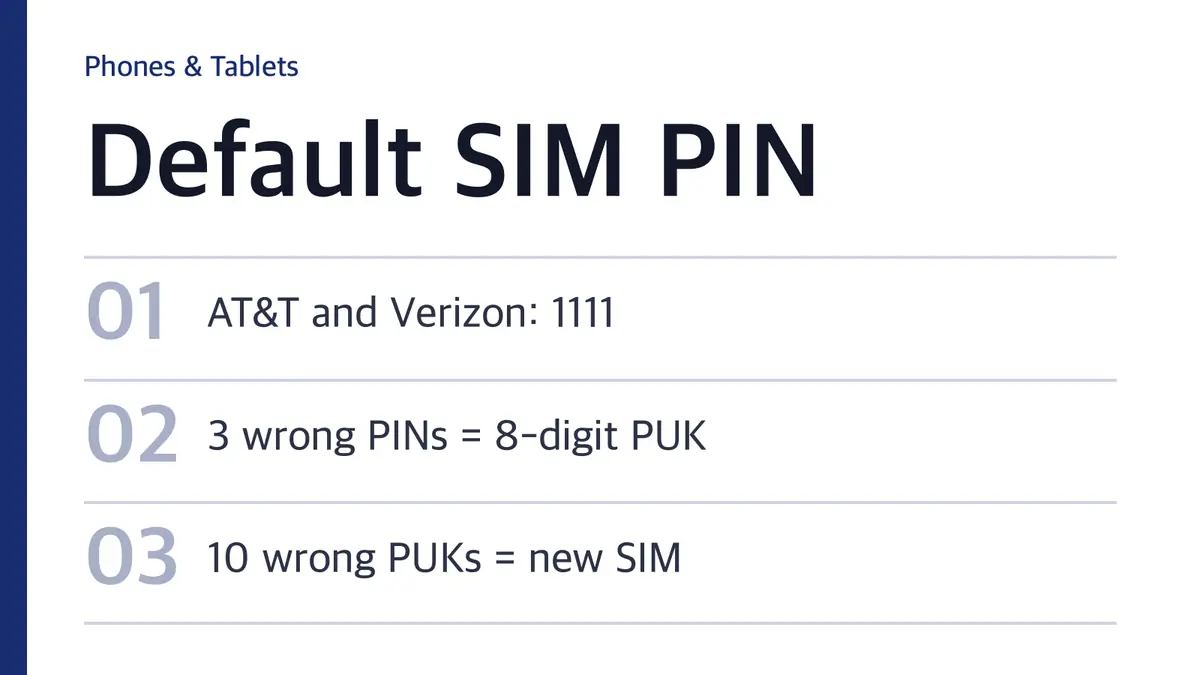
- Use the default once. If 1111 (or your carrier's code) fails, someone has changed the PIN, or the SIM came from a different carrier than you think. A second and third guess only move you closer to a PUK lock.
- Not sure which carrier issued the SIM? Apple's tip: pull out the physical card and look for the carrier's name or logo printed on it. For an eSIM on iPhone, go to Settings > Cellular; the carrier name sits right above "Turn On This Line."
How many tries you get
| Code | Length | Usual tries before it locks | What happens next |
|---|---|---|---|
| SIM PIN | 4 digits by default | 3 | The phone asks for the PUK |
| PUK | 8 digits | 10 | The SIM is dead and must be replaced |
AT&T says phones show "Enter PUK" after more than three wrong PIN entries. If you see "PUK blocked call operator" on AT&T, or "PUK exhausted" on an iPhone, the card is finished. You need a new SIM or eSIM from your carrier.
How to get your PUK
The PUK is unique to each SIM, so there is no default PUK to try. Get the real one from the carrier that issued the card.
| Carrier | Where to get the PUK |
|---|---|
| AT&T | Sign in to myAT&T, open Troubleshoot & Resolve, pick the device, then type the PUK1 (or PUK2) code the phone is asking for |
| Verizon (postpaid) | My Verizon website, under the SIM PIN / PUK lookup for your line |
| Verizon (prepaid) | Verizon customer service |
| Ting | The original SIM packaging (physical SIM) or Ting chat (eSIM or lost packaging) |
| T-Mobile and others | Your carrier's support team or a store; the PUK is tied to the SIM in your account |
You can usually do this from a computer or another phone while yours is locked. Type the PUK carefully, then set a new SIM PIN when the phone asks.
Skip sites that sell or "generate" PUK codes. The real PUK sits in your carrier account, and a wrong code from a stranger burns one of your few remaining tries.
Turn SIM PIN on or off on iPhone
- Open Settings and tap Cellular.
- Tap SIM PIN. On a Dual SIM or dual-eSIM iPhone, tap the line first, then SIM PIN.
- Turn the switch on or off and enter the current PIN. If you never set one, enter the carrier default (1111 on AT&T and Verizon).
- Tap Done.
To change the code, leave SIM PIN on and tap Change SIM PIN (Verizon's iPhone guide uses this name). On an iPad with cellular, the setting is under Settings > Cellular > SIM PIN too. Verizon's iPhone guide adds that this option isn't available for a Verizon line activated on an eSIM.
Turn SIM PIN on or off on Android
The switch is called Lock SIM card or Protect SIM card, and its menu moves around between brands and Android versions. These paths come from the carrier and manufacturer guides for each phone:
| Phone | Path in Settings |
|---|---|
| Samsung Galaxy S25 series | Security and privacy > More security settings > SIM card security > Lock SIM card |
| Older Samsung Galaxy | Biometrics and security > Other security settings > Set up SIM card lock > Lock SIM card |
| Google Pixel (Pixel Fold) | Security & privacy > More security & privacy > SIM lock > Protect SIM card |
| Motorola moto g 5G | Security & privacy > More security settings > SIM card lock > Lock SIM card |
If your menu looks different, open Settings and search for SIM. To change the code, keep the lock on and tap Change SIM card PIN (Samsung, Motorola) or Change SIM PIN (Pixel).
SIM PIN vs. carrier lock: two different "SIM locked" problems
People search "SIM locked" for two unrelated problems. Even AT&T's own SIM PIN help page uses the phrase "SIM lock" for both, so here is the split.
| SIM PIN lock | Carrier lock (network lock) | |
|---|---|---|
| What is locked | The SIM card or eSIM | The phone |
| What you see | "Locked SIM," "Enter SIM PIN," "Enter PUK" | Another carrier's SIM is rejected, or "SIM not supported" |
| Who set it | You (or a previous owner) turned on a PIN | The carrier that sold the phone |
| How to fix | Enter the PIN, or the PUK from your carrier | Ask that carrier for a carrier unlock |
| Can a PUK fix it? | Yes | No |
Check for a carrier lock on iPhone: go to Settings > General > About. If "No SIM restrictions" appears next to Carrier Lock, the phone is unlocked. Apple can't unlock an iPhone for another carrier; only your current carrier can, and it may take a few days.
Samsung says it doesn't lock its phones to any network, so a network-lock prompt on a Galaxy always traces back to the carrier or retailer that sold it.
Verizon's current unlocking policy, for example:
- Postpaid: the phone unlocks automatically once it is bought at full retail price or the financing balance is paid in full.
- Gift card payoff: paying with a Verizon Gift Card delays the unlock by 35 days.
- Prepaid: the phone stays locked until 365 days of paid, active service.
- Phones reported lost or stolen are not unlocked until cleared, and an unlocked phone is never re-locked.
After a carrier unlocks an iPhone, Apple's finishing step is simple: put in the new carrier's SIM and the phone activates. If you have no other SIM to use, back up the iPhone, erase it, then restore from that backup.
Should you keep a SIM PIN on?
A SIM PIN is worth it if you get bank or email codes by text. It stops a thief from moving your SIM into another phone and reading those codes. The trade-off is one more code to type after every restart. Before turning it on, change the default 1111 to something only you know; a lock that uses the code printed in every carrier help page protects very little.
Write the new PIN down somewhere outside the phone, and keep the plastic card the SIM came on if it shows a PUK.
Sources
- Apple Support: Use a SIM PIN for your iPhone or iPad
- Apple Support: How to unlock your iPhone for use with a different carrier
- AT&T: Lock SIM card with PIN code
- AT&T: Enter PUK code
- Verizon: Apple iPhone – Enable / Disable / Modify SIM PIN
- Verizon: Samsung Galaxy S25 series – Enable / Disable / Modify SIM PIN
- Verizon: Google Pixel Fold – Enable / Disable / Modify SIM PIN
- Verizon: moto g 5G – Enable / Disable / Modify SIM PIN
- Verizon: Device Unlocking Policies
- Samsung: SIM card is asking for a PIN or network unlock code
- Ting: SIM PINs and PUK codes
Default codes, menu paths and policies as listed on each company's support pages on November 17, 2026.
Related guides
 Galaxy S23 One UI 9 Update: Live in the US Since Oct. 19, Its Last OS UpgradeOne UI 9 with Android 17 is out for the Galaxy S23, S23+ and S23 Ultra in the US. Here are the build numbers, what…
 iPhone Battery Replacement Cost: $69 to $129 at Apple by ModelApple's out-of-warranty battery service costs $69 for older iPhones, $89 to $99 for most recent ones and $119 to…