Last updated: November 22, 2026
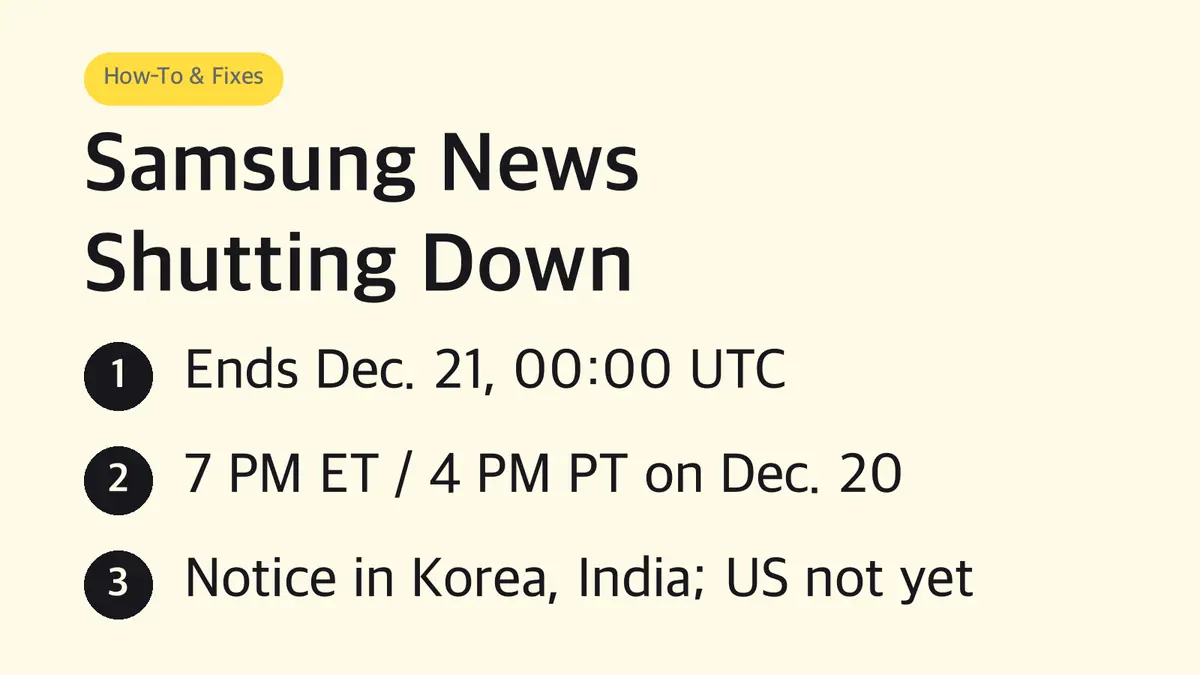
When does Samsung News shut down?
The notice gives one moment in UTC. December is standard time across the US, so the conversion is fixed:
| Time zone | Samsung News cutoff (if the US follows the same notice) |
|---|---|
| UTC (the time in Samsung's notice) | Mon, Dec. 21, 2026, 12:00 AM |
| Eastern (EST) | Sun, Dec. 20, 7:00 PM |
| Central (CST) | Sun, Dec. 20, 6:00 PM |
| Mountain (MST) | Sun, Dec. 20, 5:00 PM |
| Pacific (PST) | Sun, Dec. 20, 4:00 PM |
| Alaska (AKST) | Sun, Dec. 20, 3:00 PM |
| Hawaii (HST) | Sun, Dec. 20, 2:00 PM |
The easy mistake is reading "December 21" and assuming you have all of Monday, December 21. Anywhere in the US, the cutoff falls on Sunday afternoon or evening, December 20.
Is Samsung News shutting down in the US?
Not officially, as of November 22, 2026.
- Where the notice appeared: Samsung posted the discontinuation notice inside the Samsung News app in India and South Korea, according to SamMobile. The Korean notice is titled "Samsung News service end notice," dated October 26, 2026, and signed by the Samsung News service team.
- What Samsung US still shows: The US Samsung News page still says the app is "exclusively available on the Samsung Galaxy Store" and lists features like Daily Briefing, Yahoo Sports scores and Yahoo Finance market tracking. Samsung's US support article on Samsung News and Google Discover also has no shutdown note.
- Our read: Expect the US to follow. The notice ends the service itself, not a regional feature, and SamMobile calls a wider shutdown highly likely.
Until Samsung US posts a notice, the US date is a forecast, not a fact. In Korea and India the notice showed up in the app's own notices first, so that is where a US notice would most likely appear.
Either way, the steps below work today, and switching early costs you nothing: Samsung News and Google Discover already share the same swipe-right page on Galaxy phones.
What stops working when Samsung News ends
| Part | What happens |
|---|---|
| Samsung News app | You can no longer use it after the cutoff |
| Home screen widget | Gets no new content after the cutoff, per reports on the Indian notice |
| Swipe-right media page | The Samsung News feed on the leftmost home screen goes away |
| Your data | All personal information collected for the service is deleted without delay; data a local law requires Samsung to keep is held for that legal period, then deleted |
| Replacement | None announced by Samsung |
In the US version, Samsung News has three main tabs: News, Podcasts and Following. The Following tab holds your chosen topics, sources, local news locations and podcast subscriptions. Samsung's notice talks only about deleting data; it offers no way to move those choices to another app.
Save your follows and podcasts before the cutoff
Do this once, while the app still opens:
- Swipe right from the Home screen to open Samsung News.
- Tap the Following tab.
- Take screenshots of your topics, sources, local news locations and podcast subscriptions.
- Open the Podcasts tab and screenshot any show you are partway through.
Then add the same publishers and shows in the app you move to. A podcast you followed in Samsung News is not tied to Samsung, so the same show is available in any podcast app.
How to switch Samsung News to Google Discover
Galaxy phones that support both services let you swap them on the same page. These are Samsung's US steps:
- Touch and hold a blank area of the Home screen until it shrinks into Home screen editing mode.
- Swipe right to the farthest page.
- You will see Google Discover and Samsung News side by side. Tap Google Discover.
- Go back to the Home screen. Swiping right now opens Google Discover.
Google Discover builds its feed from your Google search and browsing history, so it needs no setup beyond being signed in to your Google account. Samsung notes that availability of both services varies by country, carrier and model.
How to turn off the swipe-right news page completely
If you never used the feed and do not want Google Discover either:
- Touch and hold a blank area of the Home screen.
- Swipe right to the farthest page.
- Tap the switch at the top to turn off both Samsung News and Google Discover.
Swiping right from your main Home screen will then no longer open a news feed.
How to remove the Samsung News widget
The widget stops getting new stories after the cutoff, so it will sit on your screen showing old headlines. Remove it now:
- Touch and hold the Samsung News widget.
- Tap Remove.
Removing the widget does not touch your other widgets or apps.
Can you uninstall or disable Samsung News?
Samsung's US guidance gives two options, and which one you get depends on whether the app came preloaded on your phone:
| What you see | What it means | Steps |
|---|---|---|
| Uninstall | The app can be removed | Swipe up on the Home screen to open the Apps screen, touch and hold Samsung News, tap Uninstall |
| Disable only | It is a preloaded app that cannot be fully removed | Same screen, touch and hold Samsung News, tap Disable |
Samsung adds that not every preloaded app can be disabled. If neither option appears, turning off the media page (above) already keeps the feed out of your way, and the service stops on its own at the cutoff.
Notifications: turn them off now if they bother you
Samsung News can send alerts for breaking news, editor's picks and new podcast episodes. To stop them before the shutdown:
- Swipe right from the Home screen to open Samsung News.
- Tap More options (three dots), then Settings, then Notifications.
- Turn off each switch.
Alternatives to Samsung News
| If you used Samsung News for | Move to |
|---|---|
| A personalized feed on the swipe-right page | Google Discover, already built into the same page |
| Sports scores | The Yahoo Sports app (Samsung News showed Yahoo Sports data) |
| Stock and market updates | The Yahoo Finance app (Samsung News used Yahoo Finance data) |
| Podcasts | Any podcast app; add the shows from your screenshots |
| Specific publishers | Each publisher's own app or site, or follow them in Google Discover |
Why is Samsung shutting down Samsung News?
Samsung has not given a reason. Samsung News launched on April 18, 2023, replacing Samsung Free, which itself had replaced Samsung Daily and the original Bixby Home feed from 2017. This is the latest in a line of renamed news feeds on that swipe-right page, and this time Samsung has not named a successor. SamMobile notes Samsung also announced the end of its Daily+ service on TVs and smart monitors.
Sources
- Samsung US: Maximize your Galaxy experience with Samsung News and Google Discover
- Samsung US: Samsung News app page
- Samsung US: Manage apps on your Galaxy phone or tablet
- SamMobile: Samsung News app on Galaxy devices is being shut down
Menu names and positions can differ by model, carrier and One UI version. Dates and US availability reflect Samsung's pages as of November 22, 2026.
Related guides
 Samsung Apps Button Missing? Get It Back in Home Screen SettingsGalaxy phones hide the Apps button by default to free up room for app icons. One switch in Home screen settings…
 Galaxy S23 One UI 9 Update: Live in the US Since Oct. 19, Its Last OS UpgradeOne UI 9 with Android 17 is out for the Galaxy S23, S23+ and S23 Ultra in the US. Here are the build numbers, what…
 Samsung Second Screen: Needs a Tab S7 or Newer and a Miracast PCSamsung Second Screen turns a Galaxy Tab into a wireless monitor for a Windows PC. It needs a Tab S7 or newer and a…